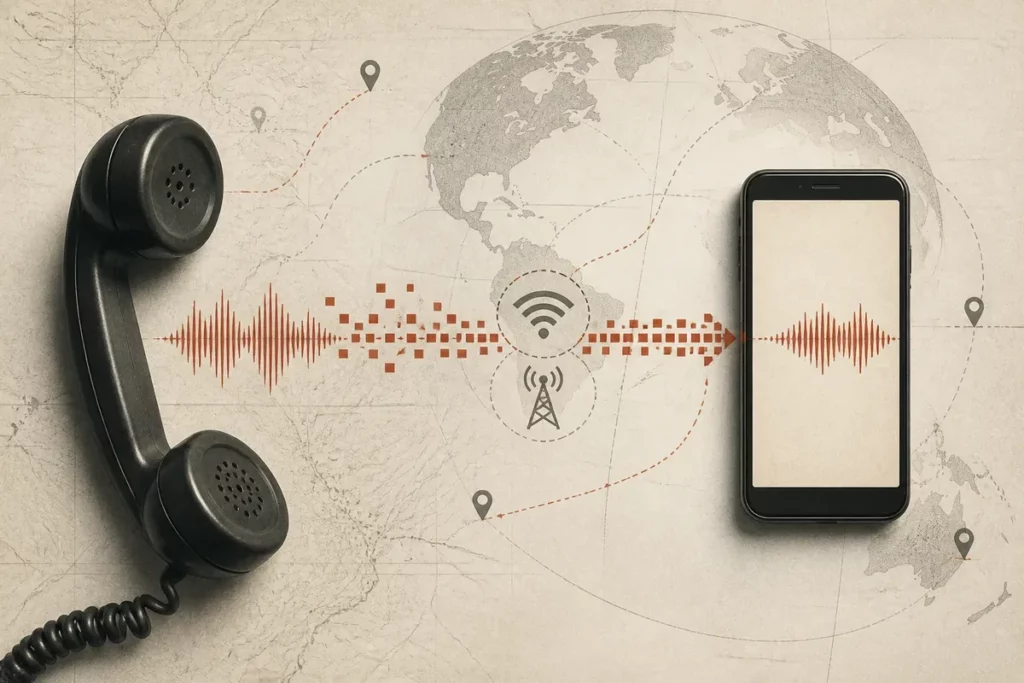
More than 3 billion Android devices can make internet phone calls, yet an Android VoIP call follows a different route from a normal carrier call. A VoIP app captures your voice, converts it into data packets, sends those packets through Wi-Fi or mobile data, and rebuilds the sound on the recipient’s device.
How VoIP apps work on Android depends on the service category: app-to-app calling, calls to ordinary phone numbers, SIP softphones, or carrier Wi-Fi Calling. The app, account model, permissions, network path, audio hardware, privacy design, and destination all affect the final call.
Quick facts
📞 VoIP means Voice over Internet Protocol: speech travels as internet data instead of using the carrier’s traditional voice network.
📶 Wi-Fi and mobile data can both carry calls. A working SIM is not inherently required for app-to-app conversations.
🔐 Encryption, cost, phone-number access, and emergency support differ by service. Never assume that every VoIP app provides the same protection or destinations.
🔧 Call quality depends on stability, upload performance, delay, packet loss, permissions, and audio routing—not download speed alone.
How VoIP works on Android: internet calls versus carrier calls
And VoIP is a calling technology that turns speech into internet data rather than placing the call on a mobile carrier’s traditional voice network. On Android, an app captures audio, sends it through an internet connection, and reconstructs the incoming voice on the other device.
Therefore, three services deserve separate treatment. An app-to-app call connects two accounts inside the same service, while a provider-backed call can reach a mobile or landline number through a telephony network. Carrier Wi-Fi Calling keeps the mobile operator, SIM identity, and ordinary phone number at the centre, even though Wi-Fi carries part of the connection.
| Calling model | Identity used | Typical destination | Key limitation |
|---|---|---|---|
| App-to-app VoIP | App account or service identity | Users on the same service | Both people may need compatible accounts |
| Provider-backed VoIP | Assigned or ported telephone number | Mobile and landline numbers | Calling minutes, subscriptions, or regional limits may apply |
| SIP softphone | SIP account from a provider | Destinations allowed by that provider | The app may not include calling service by itself |
| Carrier Wi-Fi Calling | Carrier mobile number and service | Ordinary telephone numbers | Carrier, device, country, and plan support are required |
WhatsApp, Signal, Google Meet, Skype, and Zoom can all carry voice, but their account systems, servers, codecs, encryption models, and telephone-number features are not interchangeable. The visible call button hides different technical and commercial paths.
VoIP apps are not the same as carrier Wi-Fi Calling
Carrier Wi-Fi Calling uses the operator’s service and normally preserves the user’s mobile number, while a VoIP app normally uses its own account and infrastructure. A Wi-Fi connection alone does not turn an independent app into carrier Wi-Fi Calling.
Android users should check caller identification, incoming-call behaviour, billing, roaming treatment, emergency support, and number portability separately. A familiar contact name does not reveal which network actually carries the conversation.
What happens from tapping Call to hearing a voice
But an Android VoIP call begins with a setup exchange before speech travels. The app identifies the recipient, sends a call request, alerts the other device, negotiates a usable media path, captures audio, compresses it, transports packets, and decodes the returning stream.
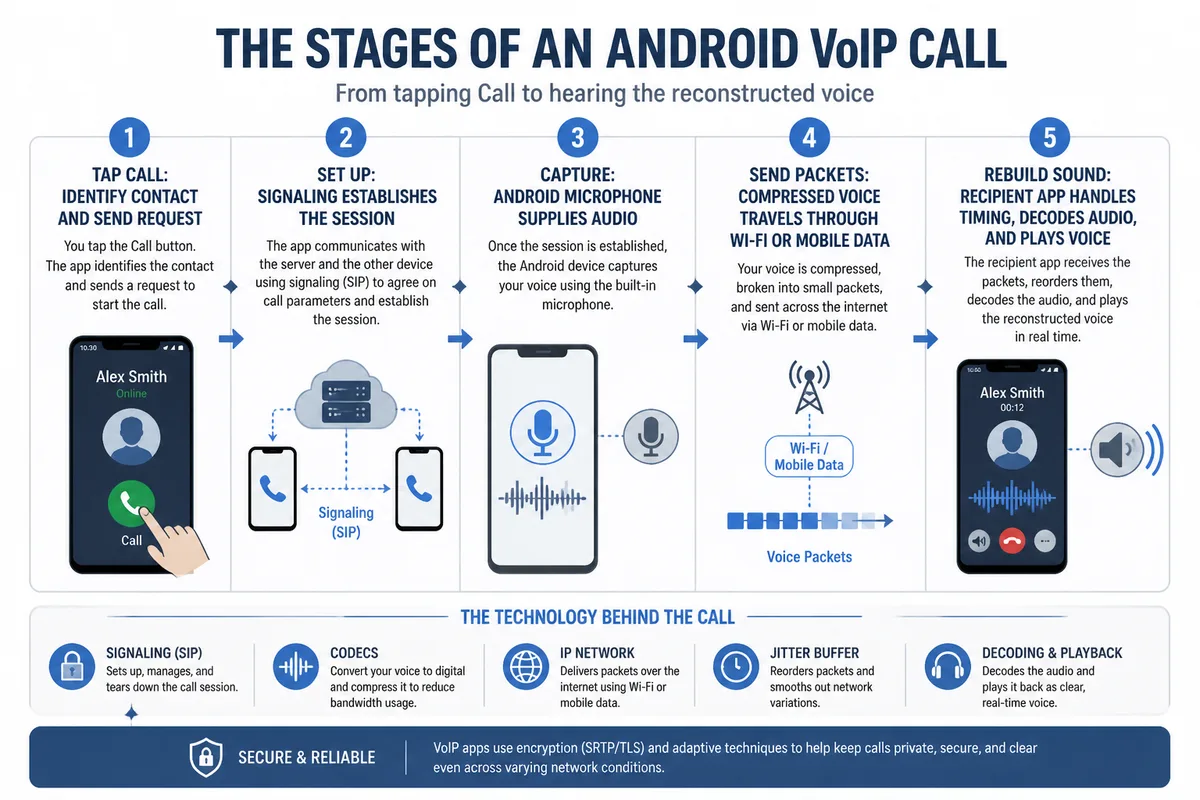
Therefore, signaling is the setup layer. Signaling establishes who is being called, whether the recipient is reachable, which devices are involved, and how the session should begin; the voice stream carries the actual audio afterward.
A codec compresses and reconstructs speech. Codec choices trade clarity, delay, resistance to poor networks, processing load, and data consumption, so no single codec is automatically ideal for every Android call.
Voice travels as many small packets rather than one continuous electrical stream. Some packets can arrive late, out of sequence, or not at all, forcing the receiving app to conceal gaps or wait briefly before playing audio.
A jitter buffer absorbs small timing differences, packet-loss handling masks missing pieces, and echo control limits feedback between the speaker and microphone. These repairs preserve a usable conversation while sometimes adding a small delay.
The same chain runs in reverse at the same time. Your microphone sends speech outward while the phone receives, decodes, and plays the other person’s voice.
How Android handles audio during the call
The microphone supplies the voice input, while Android and the app process that input before transmission. Playback can use the earpiece, loudspeaker, wired headset, or Bluetooth device selected by the user and supported by the phone.
One-way audio has several possible causes. Microphone permission, an incorrect audio route, Bluetooth behaviour, firewall traversal, or a broken network path can prevent one side from hearing the other.
What an Android phone needs for VoIP calls to connect reliably
Yet reliable Android VoIP calling requires more than installing an app. The service needs microphone access, a working network path, valid account credentials, incoming-call notifications, suitable background activity, and an audio route that reaches the intended headset or speaker.
Therefore, check microphone permission first because the app cannot transmit speech without it. Notification permission controls incoming-call alerts on supported Android versions, while background restrictions can delay alerts when the app is not visibly open.
- Microphone: required for voice transmission.
- Notifications: useful for incoming-call alerts and background wake-up behaviour.
- Contacts: optional when the app matches an address book to service accounts.
- Camera: required for video calls, not voice-only calls.
- Bluetooth or nearby-device access: relevant when wireless audio equipment is used.
- Mobile-data access: necessary when the call leaves Wi-Fi and uses cellular data.
An app may require an initial phone-number verification even when later app-to-app calls work without an active SIM. Verification, account recovery, and the ability to receive calls are separate matters.
When an Android phone moves between Wi-Fi and mobile data, the call may continue, briefly degrade, or disconnect. The result depends on the app’s session handling, the network transition, the device software, and whether both paths remain reachable.
Battery optimization, restricted background activity, data-saver settings, manufacturer-specific power controls, and outdated app versions can delay incoming calls or interrupt service. Incoming reliability is therefore a settings problem as well as a network problem.
Settings worth checking before blaming the network
Android microphone access, notification permission, mobile-data permission, battery restrictions, and the selected Bluetooth device are the first checks for a failed or missing call alert. These controls can block a service before connection quality becomes relevant.
Check whether another app is using the microphone. Confirm that the intended headset is connected, then test the same account on Wi-Fi and mobile data.
- Open Android app permissions and confirm microphone access.
- Review notification permission and background activity settings.
- Allow mobile data when the service must work away from Wi-Fi.
- Reconnect Bluetooth audio and select the correct output route.
- Update the app through the official Google Play listing.
Mobile data usage and the factors behind VoIP call quality
However, voice VoIP calls generally use much less data than video calls, and no single trustworthy figure applies to every Android app or conversation. Codec choice, audio mode, call duration, app overhead, network conditions, video, and screen sharing all change the result.
| Observed symptom | Likely technical factor | Action to try |
|---|---|---|
| Long pause before replies | Latency or excessive buffering | Try a closer access point or another network |
| Robotic or broken-up speech | Jitter or packet loss | Pause uploads and streaming |
| Call drops during movement | Weak signal or Wi-Fi-to-cellular handoff | Test the call while stationary on each network |
| Echo or repeated voice | Acoustic feedback or wrong audio route | Use an earpiece or reconnect the headset |
| Unexpected data usage | Long calls, video, sharing, or app overhead | Check Android’s per-app mobile-data screen |
Android’s per-app mobile-data settings provide a more useful personal measurement than a generic estimate because the phone records the traffic generated by your installed service. Compare a short voice-only call with a video call under your normal network conditions.
Latency is the delay before speech reaches the other person. Jitter describes uneven packet timing, packet loss means that some voice data never arrives, and congestion reduces the network’s ability to move traffic consistently.
Therefore, advertised download speed alone cannot guarantee good VoIP call quality. Stable upload performance, low delay, low packet loss, and a consistent route matter more than a large headline speed when the call carries two-way speech.
Move closer to the router, pause large uploads, try another network, update the app, reconnect Bluetooth audio, and review battery restrictions. These bounded tests identify whether the fault follows the phone, the app, or the network.
Why a strong signal can still produce a bad call
Signal bars show radio conditions, not congestion, router load, packet loss, Wi-Fi interference, or upstream quality. A slower connection with steady timing can produce a clearer call than a faster connection that repeatedly loses packets.
The recipient’s device and network also affect the shared conversation. A clean connection on your Android phone cannot repair severe delay or packet loss at the other end.
Privacy, security, costs, and emergency-call limits
Or privacy and cost belong to the service model, not to the word VoIP itself. Encryption in transit protects traffic between points, while end-to-end encryption is designed so the provider cannot ordinarily read call content during the service session.
Therefore, inspect the app’s current security and privacy documentation for identity handling, key verification, metadata retention, contact discovery, cloud features, and account recovery. An encryption label alone cannot answer every privacy question.
App-to-app calls may be available without a separate per-minute charge, but mobile data still uses the user’s Wi-Fi or cellular service. Calls to landlines and mobile numbers can involve subscriptions, credits, regional charges, or a provider account.
Zoiper illustrates the softphone distinction. The Google Play listing recorded 5M+ downloads, a 4.4-star rating, approximately 76.8K reviews, version 2.26.13, and an April 7, 2026 update; the same service category requires a SIP or IAX account from a VoIP provider. Ratings and listing details can change, so verify the live listing before relying on them.
A free download is not automatically free calling. The app price, provider service, telephone number, calling minutes, premium features, and mobile-data cost are separate layers.
SMS, MMS, short codes, and two-factor authentication also require separate verification. An app that supports voice may not receive carrier text messages, bank codes, short codes, or multimedia messages, especially when the number is hosted outside a mobile operator’s ordinary service.
Number portability is possible for some VoIP services when the number remains active and the requester owns it. A published specialist estimate places many transfers at roughly two to four weeks, but the provider, country, number type, losing carrier, and documentation determine the actual process.
Android version support and manufacturer compatibility must be checked in the current Google Play listing and the provider’s documentation. An app’s presence on Google Play does not guarantee support for every Android version, device, region, or battery-management system.
Do not treat an app-based VoIP service as a guaranteed emergency-call replacement. Internet failure, account restrictions, regional availability, location handling, battery loss, or provider policy can prevent emergency access or accurate emergency location.
Questions to ask before replacing a phone plan with an app
Can the service call the destinations you need, including local numbers and emergency services where relevant? The answer must come from the provider’s current country-specific documentation.
What account identifier and caller ID will recipients see? A username, assigned VoIP number, ported mobile number, or business identity can produce different results.
What does the provider say about encryption, metadata, retention, paid calling, SMS, and account recovery? Read the current official policy rather than relying on an app-store slogan.
What is the fallback when Wi-Fi, mobile data, battery power, or the service itself is unavailable? A replacement calling app needs a practical backup route.
The practical takeaway for Android VoIP users
Thus, how VoIP apps work on Android can be reduced to one chain: Android captures speech, the app compresses it into packets, the internet transports those packets, and the recipient app rebuilds the sound.
Reliable use requires permissions, stable two-way connectivity, correct audio routing, current software, and realistic battery settings. Price, privacy, phone-number access, SMS support, and emergency suitability remain service-specific decisions.
What to remember
- 📱 VoIP apps use internet data instead of the carrier’s traditional voice path.
- 🧭 App-to-app calling, provider VoIP, SIP softphones, and carrier Wi-Fi Calling are different services.
- 🎙️ Microphone permission, notifications, battery controls, and Bluetooth routing affect everyday reliability.
- 📊 Low delay and low packet loss matter more than advertised download speed alone.
- ⚠️ Verify pricing, regional access, privacy claims, SMS support, and emergency-call limits before switching plans.
Test the chosen app on your own Wi-Fi and mobile network before relying on it for an important conversation, especially before calling if emergency access matters and the carrier connection is unavailable.
Frequently Asked Questions
Do VoIP apps use mobile data on Android?
Yes, an Android VoIP app uses mobile data when the phone is not connected to Wi-Fi or when the app is permitted to use cellular data. Voice usually consumes less data than video, but the exact amount depends on the codec, duration, app overhead, and call mode.
Can VoIP apps work on Android without a SIM card?
App-to-app calls can work without an active SIM when the phone has Wi-Fi and the account is already configured. Initial phone-number verification, account recovery, and calls to ordinary telephone numbers may still require separate service conditions.
Can a VoIP app call a regular phone number?
Some provider-backed VoIP services can call mobile and landline numbers. Many consumer apps focus on calls between users of the same service, so check destinations, countries, caller ID, and charges in the provider’s current documentation.
Are Android VoIP calls free?
Some app-to-app calls may not have a separate calling charge, but mobile data still has a cost when cellular access is used. Calls to ordinary numbers, phone-number rental, subscriptions, premium features, and international destinations can require payment.
Why is my VoIP call delayed, robotic, or choppy?
Delay usually points to latency or buffering, while robotic or broken-up audio commonly reflects jitter or packet loss. Pause uploads, move closer to the router, try another network, reconnect Bluetooth audio, and check Android battery and microphone settings.
Sources useful for verification
Android Developers: Android’s official VoIP and Telecom documentation helps developers understand call management, audio integration, and system behaviour. Use it when checking how an app should interact with Android calling features.
Google Play listing: The current listing for each app provides the supported Android distribution channel, visible update information, permissions, pricing presentation, and regional availability signals. Treat ratings, downloads, and features as time-sensitive.
VoIP provider documentation: Use the provider’s current pages for number portability, calling destinations, emergency support, SMS, pricing, identity, and account requirements. Verify the country before relying on a rule or tariff.
Android device settings: The phone’s permission, notification, battery, Bluetooth, and per-app data screens show the configuration actually applied to the device.